spec lifecycle
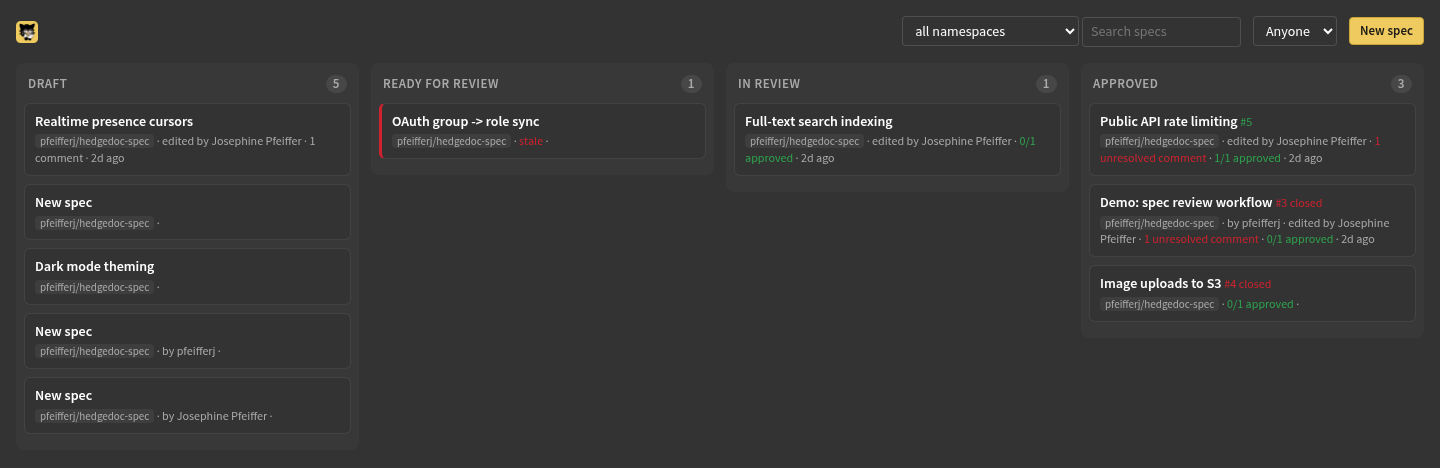
a note is a spec when its frontmatter tags include spec plus a status tag.
the most advanced status tag wins; no status tag means draft.
namespace: is the key an author types; the board's pages call the thing it
names a project.
creating a spec
the board's "new spec" button (with a project picker when more than one
repo is onboarded) offers the two kinds, each with a line on what it is for,
and opens the editor with that kind's template: spec and draft tags set,
owner prefilled with your github login, namespace from the picker or the
default. the second kind is a top-level spec.
statuses
| status | meaning | how it's reached |
|---|---|---|
draft |
being written | default for any spec note |
ready-for-review |
author considers it reviewable | "mark ready for review" in the editor navbar, or edit the tag |
in-review |
review underway | automatic once the first comment thread appears (computed by the board; resolving every thread reverts it), or "start review" |
approved |
quorum met, threads resolved | the approval that meets quorum flips the tag |
implemented |
implementing commit merged | an implements commit is detected; the card leaves the board |
cards in the review columns get a stale marker after STALE_DAYS (default
14) without changes.
review
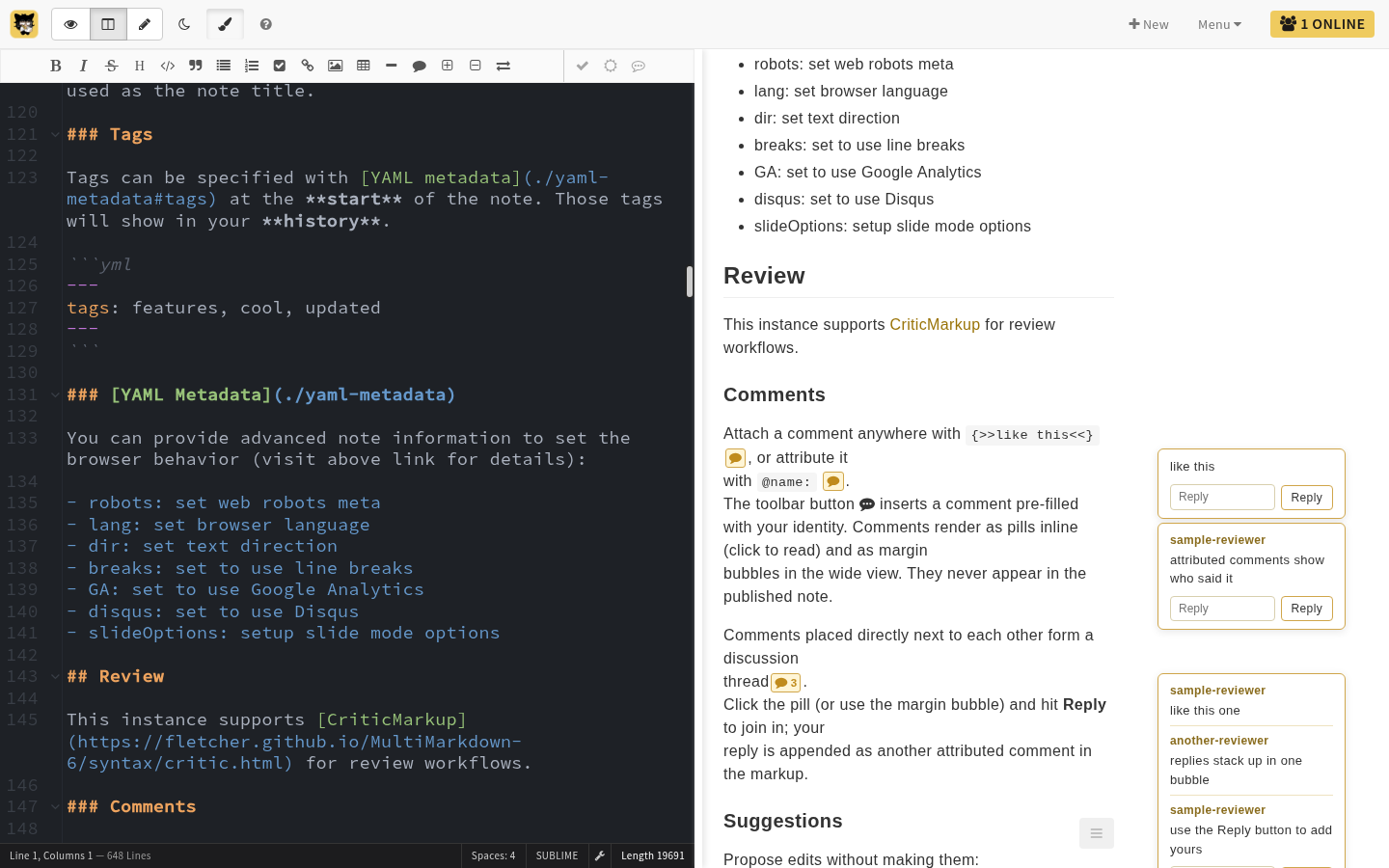
reviewers work inside the note with criticmarkup; the toolbar covers all of it, nobody needs to learn the syntax:
- comments:
{>>@name: text<<}, shown as margin bubbles and inline pills. adjacent comments form a thread; the reply box appends to it. opened cards can overlap the editor in split view, keeping their reply and resolve controls reachable. - the comment and suggestion tools refuse positions in the yaml header,
including before its opening
---; place reviews in the body below it. an editor upgrade also repairs existing specs with comments before the opening delimiter, moving those comments below the header with their attribution intact. the board also recognizes these specs before the stored note is repaired; their open comments still block publication. - suggestions: insert, delete, and replace spans with accept/reject buttons. a pending one blocks approval like an open thread does, because the PR is written with every suggestion in its accepted form: approving around one would publish an edit no approver agreed to. accept or reject it and the markup is gone, which clears the gate. highlights are not edits and never block.
- resolving a thread means accepting or deleting its markup, or the bubble's
resolve button. unresolved threads show on the card and block approval.
resolved ones stay in the note and read back through "show resolved" in the
toc menu; reopening one means deleting its
{>>%%resolved%%<<}marker in the editor pane. - each thread has a deep link: the bubble's copy-link button yields
<note-url>#comment-<hash>, which on load scrolls to and highlights that thread. the hash is derived from the first message's author and text, so a link survives edits elsewhere in the note but breaks if that message's text changes. bot review notifications link straight to the thread the bot added.
approvers from the project's .specs/roles.yml get an approvals dropdown
in the navbar: the full roster with each approver's state. approve shows
while the spec is ready-for-review or in-review. clicking saves the exact
text being reviewed, then asks the board to verify that version and record
the approval. once the board confirms, the editor adds the name to the note's
approved-by list. the roster reads the board's record, so a name typed into the list
by hand shows as pending and is not counted until its owner approves from the
navbar. retract works the same way in reverse.
a review bot reads the project's approved top-level specs alongside the spec it reviews and flags a contradiction by principle ID. it also reads up to three approved specs the spec under review depends on, that depend on it, or that share its area, and flags a statement that cannot hold at the same time as one of them. that finding is advisory: it shows on the board card as "N possible conflicts" and never blocks approval, because a call about a second document nobody is editing is not certain enough to hold a spec up. a contradiction inside the spec itself is an ordinary review comment and blocks like one.
what changed
the board keeps the published form of a spec (frontmatter stripped, review markup resolved, the text a PR would carry) at every moment a reviewer might want to diff against: each status change, each approval (one per approver, replaced when they re-approve), and each publish. hedgedoc's own revisions are saved on an idle timer and carry the frontmatter and comment threads, so they are not that.
/changes/<note> on the board diffs any two of those, or one against the live
note, at word level, and names the requirement ids (FR-nnn, SC-nnn) that
were added, removed or changed between them. with no arguments it starts from
the most useful anchor: your own approval when you are signed in to the board
and approved this spec, else the text as it was approved, else the last status
change. ?from= and ?to= take a snapshot id, approval:<login>,
status:<phase>, published:rN or current.
an approval stays credited when the text moves on. the board lists the approvers it moved past on the card ("changed since N approvals") and in the editor's roster ("approved, changed since"), and mails each of them once per new text with a link to the diff from their own approval. whether the change warrants a fresh look is theirs to decide; retracting and re-approving from the navbar records a new snapshot.
a spec that leaves approved or implemented for an earlier status (by hand,
or because a bot suggestion or feedback proposal landed) loses the approvals
from that round on the next poll, so it needs quorum again before it
publishes. the snapshot taken when it was approved stays as the diff baseline.
what approval triggers
once the approved tag is set, quorum is met, and no thread remains open,
the board starts this work on its next poll:
- locks the note via hedgedoc's
lockedpermission: everyone reads, only the owner edits. one-shot; an owner who deliberately unlocks later isn't re-locked. the editor defers the lock while anyone has the note open; close those tabs to let it finish. reopening a review similarly defers the unlock. - opens the spec PR:
<specs-dir>/NNN-slug.md(or<specs-dir>/<area>/NNN-slug.mdwhen the note declares an area;<specs-dir>/<slug>.mdfor a top-level spec), criticmarkup resolved to its accepted form, frontmatter stripped, first paragraph as the PR abstract. the board tries the spec owner's github token first and falls back to its own; the fallback is logged, not shown in the PR. - the PR number becomes the spec's reference number.
the spec commit carries gerrit-style trailers, so git log records the
review in the target repo:
spec: add 013 New approach

Spec-Id: rBk2DfsJR52onFFi8X5u-A
Reviewed-on: https://<editor-host>/rBk2DfsJR52onFFi8X5u-A
Reviewed-by: @alice
Reviewed-by: @bob
Reviewed-by: Carol C <carol@example.org>
Spec-Id is the note's stable id, Reviewed-on links back to the note, and
Reviewed-by is emitted per approver who signed off, then per person who
commented on the note. a Supersedes: trailer is added when the spec replaces
another.
an approval is a record on the board, made when an approver presses the
navbar button. the editor signs the GitHub identity, note, action and exact
saved-text hash (with the secret the two services share,
configuration). the board checks that login against
roles.yml and records the snapshot only if the saved text still matches.
an edit during the request asks the reviewer to retry. nothing in the note
itself counts: approved-by is
written by the editor after the board has answered, and a name put there by
any other means is shown as pending and never earns quorum or a trailer.
a commenter is credited on the same evidence: at least one {>>@name: ...<<}
signature carrying their display name was written by their own session,
replies and resolved threads included. the spec author is never their own reviewer,
and a guest or a review bot has no account to credit.
an approved tag without quorum, with open threads, or with pending
suggestions gets the PR withheld (logged by the poller, and the card says
which); the tag alone is never enough on a governed repo.
implemented
the spec completes when a commit referencing it merges to the default branch of one of the project's implementation repos:
a bare #12 resolves against the repo being scanned, so it only works for code
living in the spec repo itself. from anywhere else write
implements owner/spec-repo#12. the board marks
the spec implemented, sends a notification, and drops the card while keeping
its state. a top-level spec never becomes implemented; a reference to its PR
is ignored.
revising a merged spec
a change that keeps the spec's identity, like a correction the implementation forced, is edited in place rather than replaced. approval locks the note, so the owner unlocks it or makes the edit themselves:
- drop the
approvedtag back toin-review(the automatic bump only fires fromready-for-review, so an approved note stays put until the tag moves). - review and adapt as usual; the
approved-bylist and the threads work the same way. - approve again. quorum and open threads are re-checked from scratch.
the board then opens a revision PR against the same spec file, on the spec's
own branch name plus -r1 (-r2 for the next revision, and so on), with the
commit <prefix>update NNN Title and fresh Reviewed-by trailers. the card
links it as rev #<pr> next to the original.
the tag round trip is the convention, not the gate: any edit to a merged spec that still meets quorum with no open threads publishes a revision. as with the first PR, landing it is a human merge in the target repo. when the board holds the previous published text (every publish since it started keeping them), the revision PR opens with the requirement ids that changed since it and a link to the board's diff of the two, so a reviewer decides from the first line whether to open the file diff.
the original PR number stays the spec's number: implements and supersedes
refs keep pointing at it, and a title edit never re-paths the file. further
edits while the revision PR is open land on the same branch; the next edit
after it merges or closes starts the next revision. re-approving without
touching the content publishes nothing, and neither does editing the
namespace frontmatter, which stays pinned to the repo the spec published to.
a spec that merged before the board tracked revisions has no record of what it published, so the first poll that sees it approved treats the note as it stands as the published text. only edits after that count as a revision.
learning from implementation review
a project can select a feedback bot in its protected review configuration
(onboarding). when a linked implementation PR merges, the
board collects its review discussion and relevant final code changes and asks
the bot which lessons belong in the spec. the PR description must contain
implements owner/spec-repo#12; a bare implements #12 refers to the
implementation repo itself. followup PRs can reference an already implemented
spec. generated spec PRs are excluded.
each proposal lands in the note itself, once the note has been quiet for
REVIEW_IDLE_MINUTES and nobody has it open: the current wording becomes a
suggestion carrying the proposed wording, with a comment thread under the
bot's name giving the reasoning and the pull request it came from. accept or
reject it in the editor like any other suggestion. wording the live note no
longer contains arrives as a comment thread alone.
an approved or implemented spec goes back to in-review when a proposal
lands, so the suggestion has to be settled and the spec re-approved before
it publishes again; the ordinary revision flow takes it from there. a code
mistake that violates a clear requirement needs no amendment. a reusable
lesson can instead propose a change to an existing top-level spec; once
adopted, subsequent ordinary reviews inherit the improved principle.
under settings → spec amendments from code review, a project approver or board admin can toggle automatic spec amendment proposals off for that project. this pauses collection, generation and placement; suggestions already in notes stay where they are. turning automation back on resumes the rolling discovery window.
superseding a spec
when a spec needs replacing rather than editing, start a replacement: any
card with a PR carries a replace link (show implemented reveals shipped
specs so those are replaceable too). it opens a new spec in the same
project with supersedes prefilled:
supersedes: 12          # a spec number in this project
# supersedes: owner/repo#12   # or one in another project
the replacement is an ordinary spec and goes through its own review. nothing happens to the old spec until the replacement's PR opens, so an abandoned replacement never retires a live spec. once approved:
- the old spec drops off the board (state kept, like an implemented spec).
- the old spec file gets a "superseded by #M" banner, committed on the replacement's branch so it rides in the same PR (same-repo, once the old spec has merged; cross-repo or not-yet-merged targets are left to the webhook).
- the replacement commit records a
Supersedes: owner/repo#Ntrailer, and the board posts the supersede on the webhook.
use a bare number for a same-project target: yaml reads an unquoted
leading # as a comment, so supersedes: #12 silently drops the value.
a spec left depending on one that has been superseded is not caught here; it surfaces when a checkpoint is cut.
top-level specs
some documents are not features but constraints every feature inherits: a
design philosophy, a testing approach, naming conventions. frontmatter
kind: top-level marks one:
it goes through the same review and approval as a feature spec, with these differences:
- no number and no area: it publishes at
<specs-dir>/<slug>.md, the slug taken from the title (Philosophybecomesphilosophy.md). the path is pinned when the PR opens, so a later title edit does not move the file. - cited by name and by the IDs it defines (
P4), never by number. a feature spec does not declaredepends-ona top-level spec: inheritance is implicit, and a declared relation would hide a contradiction finding at checkpoint time. - a spec that contradicts one of its principles has to say so in prose and argue the case. the review bot reads the project's approved top-level specs with every review and flags a contradiction by ID; the checkpoint overlap pass does the same across the corpus. a top-level spec is never sent as a peer, so it is never in the corpus twice.
- its lifecycle ends at
approved. changes ride the revision flow like any merged spec. retire a principle by saying so under its ID rather than deleting it, so citations keep resolving. - the map lists top-level specs first, in their own section.
the map
depends-on records what a spec builds on. it takes the same reference forms
as supersedes, but a list of them:
depends-on: [12, 7]           # spec numbers in this project
# depends-on: [owner/repo#12] # or in another project
the same yaml gotcha applies, so prefer bare numbers. a reference that matches no tracked spec is drawn and marked unknown.
from depends-on, supersedes and the area each spec declares, the board
derives a map of the approved and implemented specs. it appears in two places.
- the board's Spec library link, grouped by project and area, top-level specs first, with each spec's first paragraph, what it depends on, and what depends on it.
README.mdin the project's specs dir, as a mermaid diagram plus a table. github renders it when anyone browses the directory. it is written on the spec pr's own branch, alongside the spec file, so it lands when that pr merges; the default branch is usually protected. it lists only specs that have a number, since those are the ones with a file in the repo. a project that publishes at the repo apex gets noREADME.md: that file is the project's own, sospecs-dir: .inroles.ymlopts out.
because it rides in the spec pr, the repo copy refreshes when a spec is
published, not when one is implemented: a spec that shipped since the last
publish still reads approved until the next spec lands.
cutting a checkpoint refuses on a stale copy, and offers a pull request that regenerates it.
the rendered view
hedgedoc hides frontmatter from the rendered half, so the editor renders a
header above the document: title, phase, spec number, owner, the namespace
and area values, and the supersedes / depends-on targets as links. the
frontmatter carries it until the board answers, which is what supplies the
number, the phase once an implements commit has moved it, and the area the
spec actually files under. a declared area the project does not route to is
struck through: that spec publishes with no area subdir.
references to other specs in the prose are linked too, in the two spellings the board already parses:
see #12 for the routing model          a spec in this note's project
see netfyr/specs#12 for the details    a spec in another one
a link goes to <spec board>/spec/<owner>/<repo>/<n>, which redirects to the
reviewable note when the board tracks that spec and to its pull request
otherwise. this needs CMD_SPEC_BOARD_URL set on the editor; without it
references stay plain text.
what is not linked: anything in code spans or fenced code, since a number in a
command is not a reference; anything inside a heading, because
heading ids are derived from their rendered html and linking there would move
every anchor; and #12ab34 or ##12, which are not references.
the published /s/ view carries the prose links but no header: the server
strips the frontmatter before that page renders.
notifications
with a webhook configured, the board posts on: status moves, new comments during review, approvals, the post-approval lock, PR opened, revision PR opened, supersede, and implementation.
email digests group activity by spec. review starts, discussion updates and changes since your approval appear in the subject; changes since your approval come first in the body with a link to the comparison. each spec explains whether you received it because you participate, watch the project, or approved earlier text. times are when the board recorded an update, in UTC.
discussion updates include short comment or reply excerpts and links to the thread. a name is attributed only when the editor's character ownership covers the whole message and matches the account profile; otherwise the digest says Signed @name. status changes have no invented actor. thread links depend on the first message's text, so the digest also keeps an ordinary spec link.
the board compares message fingerprints between polls, including resolved threads. moving, resolving or reopening unchanged text does not repeat its notification. replies and edits are described as Discussion updated because messages have no permanent IDs; activity created and removed between polls is not recoverable. the first poll after an upgrade seeds existing discussions without replaying them. previews are capped at 20 per spec per poll and 280 characters each, and the digest body is bounded with an omitted-activity count.
activity and its queued mail commit in one database transaction. failed sends are retried; a crash after SMTP accepts a message can still cause a duplicate. only public notes are queued, and visibility is checked again before sending. private, limited, protected and deleted notes are omitted, including legacy queued lines. unsubscribe, notification settings and privacy links remain in every digest.
planning implementation
a spec's card menu on the board holds a Milestone select and Set milestone, so the milestone is set without leaving the board. the card's Implementation plan link opens the spec's planning panel, where one or more implementers are chosen. assignment is separate from authorship and review; it does not grant permissions or mark work implemented. the planning page covers every spec stage and shows due dates, progress, and each spec's dependencies and blockers.